FreeCAD part design etiketine sahip kayıtlar gösteriliyor. Tüm kayıtları göster

30 Mayıs 2023 Salı

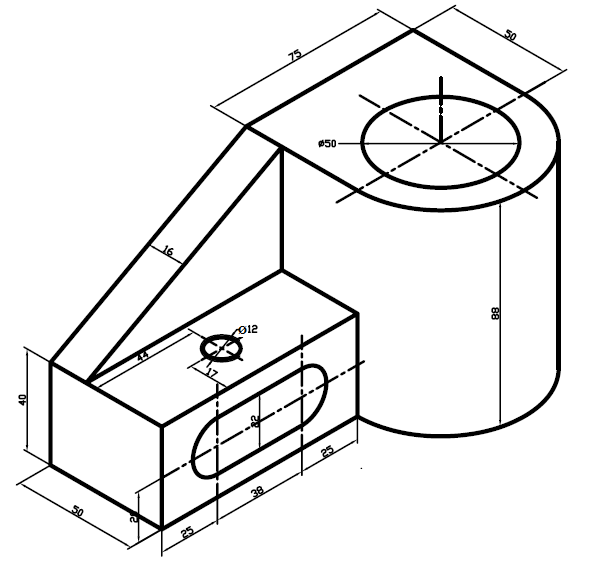
FreeCAD Part Design Technical Drawing

 Freecad is an open source CAD program to create your own designs or drawing in 2D or 3D environment. You can download it, if you want to try. I have different video tutorials to learn how to use freecad.

This technical drawing can be used in CAD programs to practice.

Part Design video tutorial includes


Creating constraints and dimensions in FreeCAD

-How to use constrain lock

-Mirroring parts in part design

-Creating additive pipe in FreeCAD

-How to change position of sketch in FreeCAD

 Video tutorial below

10 Mayıs 2023 Çarşamba

FreeCAD Mirror Tutorial in Part Design Workbench

 Part is created by mirror command. Firstly half of part is created on part design and 2D sketch, then mirror command is used to reflect other half. We can use mirrored to create symmetric drawings as a short way.

Technical drawing is below that used in video tutorial.


Part Design Mirrored command creates a new object (image) which is a reflection of the original object (source). The image object is created behind a mirror plane. The mirror plane may be standard plane (XY, YZ, or XZ), or any plane parallel to a standard plane.

 If you want, you can change planes or direction according to technical drawing or your preference. To use it, just follow simple steps below.

  1. Select the object from the Mirroring Panel list.
  2. Select a standard Mirror plane from the dropdown menu.
  3. Press OK to create mirrored object.
When you watch video tutorial below, You will see how to create part above and mirror in freecad.


20 Nisan 2023 Perşembe

FreeCAD Part Design Tutorial 20

  FreeCAD part design tutorials will continue and you can see here more technical drawing with detail explanations. If you subscribe my youtube channel, Tutorials can be seen easily.

 This is 20th part design tutorial of technical drawing. 

 All dimensions are clear to create this part design which is shown in technical drawing. When you watch video tutorial, you will see all details of contraints.
  Tutorial contains
  • How to create construction circle in freecad
  • How to create tangent constrain, coincident constraint and point constraint
  • Creating construction line with angel constrain
  • Pad and pocket tutorial for beginners
  • Creating a rib in freecad
  • How to create polar pattern in freecad or Circular pattern
  • Fillet with changing radius
  • How to use refine in freecad for part design drawings
You will learn all these steps during video.


11 Nisan 2023 Salı

FreeCAD Part Design Tutorial 18

  FreeCAD Part Design Video Tutorial Technical drawing is below. This time, I create front and top view in drawing.Video contains how to design this part in FreeCAD workbench. If you want to practice, you can watch all steps in video then you can create same drawing.


Drawing contains

  • How to decide starting plane in 2D sketch
  • Creating plane according to technical drawing
  • Using 2D sketch constraints relations
  • Creating constraints
  • Using Isometric View to create a sketch.
  • Adding Dimensions
  • Using lock constraint
  • Creating sketch without external geometry
  • Creating pad and pocket in symmetric to plane.
  • How to use symmetry button in FreeCAD 2D sketch
  • Linear Pattern in 3D sketches
If you want see all these steps, I recommend to watch below video. Subscribe my youtube channel to see more CAD tutorials. I share tutorial videos regularly.

Video Tutorial 


12 Mart 2023 Pazar

FreeCAD Part Design Tutorial 14

 FreeCAD Part Design Video Tutorial Technical drawing is below. This time, I create front and top view in drawing.Video contains how to design this part in FreeCAD workbench. If you want to practice, you can watch all steps in video then you can create same drawing.

 Both technical drawings use for same part design tutorial. First one is for how to decide starting plane. Thats why views have no dimensions. Both view can be used according to part.


Drawing contains

  • How to decide starting plane in 2D sketch
  • Creating datum plane according to technical drawing
  • Using 2D sketch constraints relations
  • Creating constraints
  • Using Isometric View to create a sketch.
  • Adding Dimensions
  • Using lock constraint
  • Creating sketch without external geometry
  • Creating pad and pocket in symmetric to plane.
  • How to use symmetry button in FreeCAD 2D sketch
  • Mirror tool in 2D and 3D sketches
  • How to copy in FreeCAD
  • Cloning in FreeCAD 2D sketch
  • Creating Rib and Support part in FreeCAD
If you want see all these steps, I recommend to watch below video. Subscribe my youtube channel to see more CAD tutorials. I share tutorial videos regularly.


20 Şubat 2023 Pazartesi

FreeCAD Part Design Tutorial 9 Isometric Drawing with Dimensions

  FreeCAD part design tutorial technical drawing is below. This is the ninth part design tutorial and tutorials will continue. If you want to watch tutorial or practice with this part, I recommend to you follow my channel. You will see all steps of tutorial.


 Drawing Includes;

  • Selecting 2D plane to start a drawing( which plane should be selected? xy,yz or xz planes)
  • Using a isometric view.
  • Creating constraints in 2d workbench
  • Drawing Centered rectangle 
  • Changing dimension in FreeCAD( 2d -3d)
  • Adding Dimensions in 2d environment
  • Creating pad and selecting faces to draw 2d sketch
  • Understanding which plane is used in FreeCAD

 Ninth part design helps to understand these list. I share a video here. You can watch my video and see technical drawing above. I recommend to watch video. I tell you how to draw it.
                          TUTORIAL VIDEO IS HERE


 If you subscribe and follow my channel. You can watch different freecad tutorials. I share videos regularly on my youtube channel.

15 Şubat 2023 Çarşamba

FreeCAD Part Design Tutorial 8

  FreeCAD part design technical drawing is below. It can be used for CAD programs for practice. You can improve your CAD skills. I add different FreeCAD tutorials. 

 Part Design 8 Technical Drawing


 Video Tutorial is below


 I have also freecad assembly, technical drawing and 2D sketch videos. Don't forget to subscribe my channel to see more FreeCAD contents. 

 FreeCAD is an open source program. Its free, this means you don't need to pay money for this program. Just download from freecad website and set up.

9 Şubat 2023 Perşembe

FreeCAD Part Design Tutorial 7 Drawing

  Part design tutorial includes 2d sketch and 3d design with constraints. This drawing is generally used 2d commands. Drawing is created on YZ plane (front view). According to technical drawing, plane place is defined.

 This is the technical drawing of Part Design Tutorial


 This is the front view of technical drawing. Rim rim point command is used to create this drawing. It works like tangent tangent radius command in Autocad. You can use it for corner radius.

Video tutorial of technical drawing below


4 Şubat 2023 Cumartesi

FreeCAD Part Design Tutorial 6 Isometric Drawing with Dimensions

  FreeCAD part design tutorial technical drawing is below. This is the 6th part design tutorial and tutorials will continue. If you want to watch tutorial or practice with this part, I recommend to you follow my channel. You will see all steps of tutorial.


 Drawing Includes;

  • Selecting 2D plane to start a drawing( which plane should be selected? xy,yz or xz planes)
  • Using a isometric view.
  • Creating constraints in 2d workbench
  • Changing dimension in FreeCAD( 2d -3d)
  • Adding Dimensions in 2d environment
  • Creating pad and selecting faces to draw 2d sketch
  • Understanding which plane is used in FreeCAD
 6th part design helps to understand these list. I share a video here. You can watch my video and see technical drawing above. I recommend to watch video. I tell you how to draw it.
                          TUTORIAL VIDEO IS HERE


3 Şubat 2023 Cuma

Part Design Tutorial 5 Technical Drawing

  FreeCAD Part Design Video Tutorial Technical drawing is below. Video contains how to design this part in FreeCAD workbench. If you want to practice, you can watch all steps in video then you can create same drawing.


 Drawing contains

  • Adding plane
  • Creating rib
  • Using mirror command
  • Adding constraints
  • Adding Dimensions
  • Creating Chamfers
  • Hide and show planes in FreeCAD
  • Creating pad and pocket in symmetric to plane.
When you watch video below, You will see how to do these in FreeCAD.

 This is 5th part design tutorial. If you want to watch other freecad tutorials, Follow my channel. I share freecad tutorials regularly.
 FreeCAD is one of the open source CAD software. That's why it can have a update. If you want to use or try latest version. Check freecad official website.

10 Ocak 2023 Salı

FreeCAD 0.20 Part Design Tutorial 3

  FreeCAD Part Design tutorial is shown youtube with all details in youtube video. Technical drawing is attached here and below video.

 You can look here to practice with video.

 If you want to see different FreeCAD videos, you can subscribe my youtube channel. You can watch many CAD video tutorials. I add technical drawings of tutorial. You can use it any CAD programs


 Video contains pad, circular pattern, 2d mirror, construction line and pocket commands. You can see all steps with explanations

 Part Design Video Tutorial of this technical drawing below.


 I will continue with other part design and FreeCAD tutuorial. All drawing and video tutorial will be shared on this blog. 

 New version of FreeCAD is released. I advise to you download it. New features are added. Also many bugs and errors are fixed. 

 FreeCAD is an open source CAD program. Open source programs can have bugs, so FreeCAD always have updates. You should check FreeCAD website to follow new versions. 

29 Aralık 2022 Perşembe

FreeCAD 0.20 Part Design Tutorial

  FreeCAD Part Design tutorial is shown youtube with all details in youtube video. Technical drawing is attached here and below video.

 You can look here to practice with video.


 If you want to see different FreeCAD videos, you can subscribe my youtube channel. You will many CAD video tutorials. I add technical drawings of tutorial. You can use it any CAD programs.

 Part Design Video Tutorial of this technical drawing below.


 I will continue with other part design and FreeCAD tutuorial. All drawing and video tutorial will be shared on this blog. 

 New version of FreeCAD is released. I advise to you download it. New features are added. Also many bugs and errors are fixed. 

 FreeCAD is an open source CAD program. Open source programs can have bugs, so FreeCAD always have updates. You should check FreeCAD website to follow new versions.